上篇文章中提到Spine和Dragonbones两个工具,这几天先研究了一下Spine的部分换装的实现,看看是否符合项目需求,简单记录一下。
由于需要在iOS和Android两个平台上使用,所以需要一个支持C或C++的运行库,在官方上找到只有两个:SFML和cocos2d-x,本着支持国产(。。)先使用cocos2d-x先试验一下。
了解cocos2d-x
一个简单的游戏界面(这里是官方教程的摘要):

导演(Director)
Cocos2d-x 使用导演的概念,这个导演和电影制作过程中的导演一样!导演控制电影制作流程,指导团队完成各项任务。在使用 Cocos2d-x 开发游戏的过程中,你可以认为自己是执行制片人,告诉 导演(Director) 该怎么办!一个常见的 Director 任务是控制场景替换和转换。 Director是一个共享的单例对象,可以在代码中的任何地方调用。它完成包括设置OpenGL ES运行环境、启动Game Loop等在内的一系列工作。
场景(Scene)
上面的画面就可以看做一个场景,一个游戏由很多场景组成,一个场景可以代表一个关卡、一声战斗等等。
场景图(Scene Graph)
场景图(Scene Graph)是一种安排场景内对象的数据结构,它把场景内所有的 节点(Node) 都包含在一个 树(tree) 上。(场景图虽然叫做"图",但实际使用一个树结构来表示)。

这个树决定了场景的绘制顺序——树的中序遍历顺序就是场景中事物的绘制顺序。
我们使用Scene的addChild()方法构建场景图:
// Adds a child with the z-order of -2, that means
// it goes to the "left" side of the tree (because it is negative)
scene->addChild(title_node, -2);

// When you don't specify the z-order, it will use 0
scene->addChild(label_node);

// Adds a child with the z-order of 1, that means
// it goes to the "right" side of the tree (because it is positive)
scene->addChild(sprite_node, 1);
渲染时 z-order 值大的节点对象会后绘制,值小的节点对象先绘制。如果两个节点对象的绘制范围有重叠,z-order 值大的可能会覆盖 z-order 值小的。
精灵(Sprite)
所有的游戏都有 精灵(Sprite) 对象,精灵是您在屏幕上移动的对象,它能被控制。你喜欢玩的游戏中主角可能就是一个精灵,我知道你在想是不是每个图形对象都是一个精灵,不是的,为什么? 如果你能控制它,它才是一个精灵,如果无法控制,那就只是一个节点(Node)。
动作(Action)
创建一个场景,在场景里面增加精灵只是完成一个游戏的第一步,接下来我们要解决的问题就是,怎么让精灵动起来。动作(Action) 就是用来解决这个问题的,它可以让精灵在场景中移动,如从一个点移动到另外一个点。你还可以创建一个动作 序列(Sequence) ,让精灵按照这个序列做连续的动作,在动作过程中你可以改变精灵的位置,旋转角度,缩放比例等等。
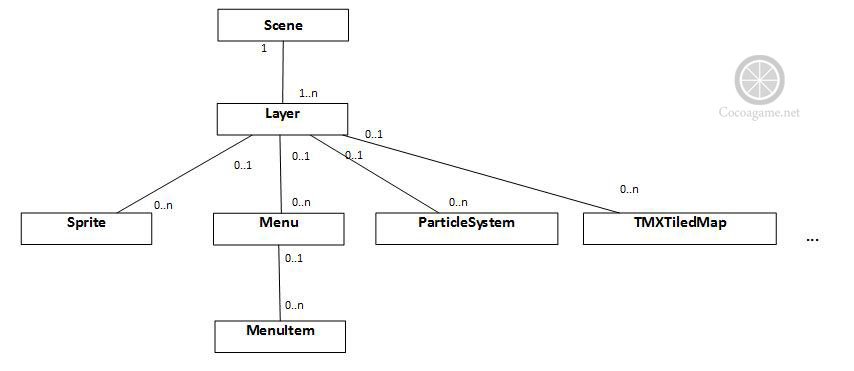
总结起来,一个游戏主要由上述模块构成,它们的对应关系以及类图如下(图片引自网上):

运行官方Demo
- Install Xcode
- Install Homebrew
- Open a terminal and install CMake via
brew install cmake - Download the Spine Runtimes repository using git (
git clone https://github.com/esotericsoftware/spine-runtimes) or download it as a zip via the download button above. - Open a terminal, and
cdinto thespine-runtimes/spine-cocos2dxfolder - Type
mkdir build && cd build && cmake ../... This will download the cocos2d-x dependency and wire it up with the example source code inspine-runtimes/spine-cocos2dx/example. The download is 400mb, so get yourself a cup of tea. - Open the Xcode project in
spine-runtimes/spine-cocos2dx/example/proj.ios_mac - Expand the
cocos2d_libs.xcodeprojsub project, delete the groupeditor-support/spine. This will remove the outdated Spine cocos2d-x runtime shipped by cocos2d-x. - Click the
Runbutton or typeCMD+Rto run the example
以上是官方指导,开始里没按这个来,结果没有cocos2dx的环境,这个指导的位置在文档的中部,不是很容易引起注意。
理解Spine的结构
Spine的结构是 Skeleton(骨架)-->Bone(骨头)-->Slot(插槽)-->Attachment(附件)。 一个插槽可以有多个附件,但一次只能看到一个,即一个Slot当前状态只能有一个Attachment存在。一个插槽的多个附件不能同时可见的原因是如果同时可见的话,附件的绘制顺序就无法明确。
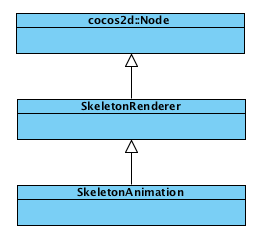
自己画完图后发现这个图已经有了。。。。
Node
它是cocos2d的基类,scene上的对象基本都是继承它,比如:Scene, Layer, Sprite, Menu, Label。
它提供以下功能:
- 管理整个场景树,提供
addChild,getChildByTag,removeChild等功能。 - 调用周期性执行的函数 (
schedule,unschedule, etc) - 执行动作(
runAction,stopAction, etc)
SkeletonRenderer
提供了Skeleton的绘制功能。同时提供了setSkin,setAttachment等设置接口,以及findBone,findSlot等get接口
SkeletonAnimation
绘制Skeleton和使Skeleton完成动画的一个类,提供了AnimationState,在加入多个动画时使用。
更改Spine源代码
我们部分换装的思路是动态的更换skin内slot中的attachment,如果spine使用了改变attachment的方法来做动画的话,需要将skin中的对应slot中的所有attachment都换掉,这就需要定一个和设计方面的规则,用来换装。
基础功能实现如下,在SkeletonAnimation.c中加入如下函数:
//根据slot和attachment的名字来换装
bool SkeletonAnimation::replacementParts(const std::string& skinName, const std::string& slotName, const std::string& attachmentName) {
if (skinName.empty())
{
return false;
}
spSkin *skin = spSkeletonData_findSkin(_skeleton->data, skinName.c_str());
if (!skin) return false;
spSlot *slot = spSkeleton_findSlot(_skeleton, slotName.c_str());
if (!slot) return false;
spAttachment *attachment = spSkin_getAttachment(skin, slot->data->index, attachmentName.c_str());
if (attachment)
{
spSlot_setAttachment(slot, attachment);
// 在当前皮肤中添加贴图
spAttachment *newAttactment = this->copyAttachment(attachment);
spSkin_removeAttachment(_skeleton->skin, slot->data->index, attachmentName.c_str());
spSkin_addAttachment(_skeleton->skin, slot->data->index, attachmentName.c_str(), newAttactment);
}
return true;
}
/*只适用于attachment的loader为Cocos2dAttachmentLoader*/
/*目前只实现了SP_ATTACHMENT_REGION和SP_ATTACHMENT_MESH这两种,由于时间原因,其它的类型暂未用到,就没有实现,有时间时再实现*/
spAttachment *SkeletonAnimation::copyAttachment(spAttachment *att) {
spAttachmentType type = att->type;
const char* name = att->name;
spAttachmentLoader *attachmentLoader = SUB_CAST(spAttachmentLoader, Cocos2dAttachmentLoader_create(this->_atlas));
switch (type) {
case SP_ATTACHMENT_REGION: {
spRegionAttachment *oldRegion = SUB_CAST(spRegionAttachment, att);
const char* path = oldRegion->path;
spAttachment* attachment;
attachment = spAttachmentLoader_createAttachment(attachmentLoader, _skeleton->skin, type, name, path);
spRegionAttachment *region = SUB_CAST(spRegionAttachment, attachment);
// const void *const vtable = att->vtable;
memcpy(®ion->x, &oldRegion->x, sizeof(float)*7);
memcpy(®ion->color, &oldRegion->color, sizeof(spColor));
memcpy(®ion->regionOffsetX, &oldRegion->regionOffsetX, sizeof(float)*16 + sizeof(int)*6);
attachment->attachmentLoader = attachmentLoader;
// FREE(region->path);
// MALLOC_STR(region->path, path);
spRegionAttachment_updateOffset(region);
spAttachmentLoader_configureAttachment(attachmentLoader, attachment);
return attachment;
}
case SP_ATTACHMENT_BOUNDING_BOX: {
spAttachment* attachment = spAttachmentLoader_createAttachment(attachmentLoader, _skeleton->skin, type, name, 0);
spVertexAttachment *vertexAtt = SUB_CAST(spVertexAttachment, attachment);
spVertexAttachment *oldVertexAtt = SUB_CAST(spVertexAttachment, att);
memcpy(vertexAtt, oldVertexAtt, sizeof(spVertexAttachment));
vertexAtt->bones = (int *)MALLOC(int, oldVertexAtt->bonesCount);
memcpy(vertexAtt->bones, oldVertexAtt->bones, sizeof(int) * oldVertexAtt->bonesCount);
vertexAtt->vertices = (float *)MALLOC(float, oldVertexAtt->verticesCount);
memcpy(vertexAtt->vertices, oldVertexAtt->vertices, sizeof(float) * oldVertexAtt->verticesCount);
spAttachmentLoader_configureAttachment(attachmentLoader, attachment);
return attachment;
}
case SP_ATTACHMENT_MESH: {
spMeshAttachment *oldMesh = SUB_CAST(spMeshAttachment, att);
const char* path = oldMesh->path;
int vertexCount;
spAttachment* attachment;
spMeshAttachment* mesh;
attachment = spAttachmentLoader_createAttachment(attachmentLoader, _skeleton->skin, type, name, path);
mesh = SUB_CAST(spMeshAttachment, attachment);
MALLOC_STR(mesh->path, path);
memcpy(&mesh->color, &oldMesh->color, sizeof(spColor));
vertexCount = SUPER(oldMesh)->worldVerticesLength;
mesh->regionUVs = (float *)MALLOC(float, vertexCount);
memcpy(mesh->regionUVs, oldMesh->regionUVs, sizeof(float) * (vertexCount << 1));
mesh->triangles = (unsigned short *)MALLOC(unsigned short, oldMesh->trianglesCount);
memcpy(mesh->triangles, oldMesh->triangles, sizeof(unsigned short) * (oldMesh->trianglesCount));
spVertexAttachment* vertexAtt = SUPER(mesh);
spVertexAttachment* oldVertexAtt = SUPER(oldMesh);
vertexAtt->verticesCount = oldVertexAtt->verticesCount;
vertexAtt->bonesCount = oldVertexAtt->bonesCount;
vertexAtt->bones = (int *)MALLOC(int, oldVertexAtt->bonesCount);
memcpy(vertexAtt->bones, oldVertexAtt->bones, sizeof(int) * oldVertexAtt->bonesCount);
vertexAtt->vertices = (float *)MALLOC(float, oldVertexAtt->verticesCount);
memcpy(vertexAtt->vertices, oldVertexAtt->vertices, sizeof(float) * oldVertexAtt->verticesCount);
spMeshAttachment_updateUVs(mesh);
mesh->hullLength = oldMesh->hullLength;
mesh->edgesCount = oldMesh->edgesCount;
mesh->edges = (int *)MALLOC(int, oldMesh->edgesCount);
memcpy(mesh->edges, oldMesh->edges, sizeof(int) * oldMesh->edgesCount);
mesh->width = oldMesh->width;
mesh->height = oldMesh->width;
spAttachmentLoader_configureAttachment(attachmentLoader, attachment);
return attachment;
}
case SP_ATTACHMENT_LINKED_MESH: {
// const char* skinName;
// const char* parent;
// spAttachment* attachment;
// spMeshAttachment* mesh;
// const char* path = readString(input);
// if (!path) MALLOC_STR(path, name);
// attachment = spAttachmentLoader_createAttachment(self->attachmentLoader, skin, type, name, path);
// mesh = SUB_CAST(spMeshAttachment, attachment);
// mesh->path = path;
// readColor(input, &mesh->color.r, &mesh->color.g, &mesh->color.b, &mesh->color.a);
// skinName = readString(input);
// parent = readString(input);
// mesh->inheritDeform = readBoolean(input);
// if (nonessential) {
// mesh->width = readFloat(input) * self->scale;
// mesh->height = readFloat(input) * self->scale;
// }
// _spSkeletonBinary_addLinkedMesh(self, mesh, skinName, slotIndex, parent);
// if (freeName) FREE(name);
// return attachment;
}
case SP_ATTACHMENT_PATH: {
// spAttachment* attachment = spAttachmentLoader_createAttachment(self->attachmentLoader, skin, type, name, 0);
// spPathAttachment* path = SUB_CAST(spPathAttachment, attachment);
// int vertexCount = 0;
// path->closed = readBoolean(input);
// path->constantSpeed = readBoolean(input);
// vertexCount = readVarint(input, 1);
// _readVertices(self, input, SUPER(path), vertexCount);
// path->lengthsLength = vertexCount / 3;
// path->lengths = MALLOC(float, path->lengthsLength);
// for (i = 0; i < path->lengthsLength; ++i) {
// path->lengths[i] = readFloat(input) * self->scale;
// }
// if (nonessential) readInt(input); /* Skip color. */
// if (freeName) FREE(name);
// return attachment;
}
case SP_ATTACHMENT_POINT: {
// spAttachment* attachment = spAttachmentLoader_createAttachment(self->attachmentLoader, skin, type, name, 0);
// spPointAttachment* point = SUB_CAST(spPointAttachment, attachment);
// point->rotation = readFloat(input);
// point->x = readFloat(input) * self->scale;
// point->y = readFloat(input) * self->scale;
//
// if (nonessential) {
// readColor(input, &point->color.r, &point->color.g, &point->color.b, &point->color.a);
// }
// return attachment;
}
case SP_ATTACHMENT_CLIPPING: {
// int endSlotIndex = readVarint(input, 1);
// int vertexCount = readVarint(input, 1);
// spAttachment* attachment = spAttachmentLoader_createAttachment(self->attachmentLoader, skin, type, name, 0);
// spClippingAttachment* clip = SUB_CAST(spClippingAttachment, attachment);
// _readVertices(self, input, SUB_CAST(spVertexAttachment, attachment), vertexCount);
// if (nonessential) readInt(input); /* Skip color. */
// clip->endSlot = skeletonData->slots[endSlotIndex];
// spAttachmentLoader_configureAttachment(self->attachmentLoader, attachment);
// if (freeName) FREE(name);
// return attachment;
}
}
return 0;
}
在skin.c文件中加入下面函数
void spSkin_removeAttachment (spSkin* self, int slotIndex, const char* name) {
    _Entry* entry = SUB_CAST(_spSkin, self)->entries;
    _Entry* pre = NULL;
    while (entry) {
        if ( (entry->slotIndex == slotIndex) &&
            (strcmp(entry->name, name) == 0) ) {
            if (pre) {
                //不是头结点
                pre->next = entry->next;
            }
            if (entry == SUB_CAST(_spSkin, self)->entries) {
                SUB_CAST(_spSkin, self)->entries = entry->next;
            }

            _Entry_dispose(entry);
            break;
        }

        pre = entry;
        entry = entry->next;
    }
}